Aquarium countdown timer
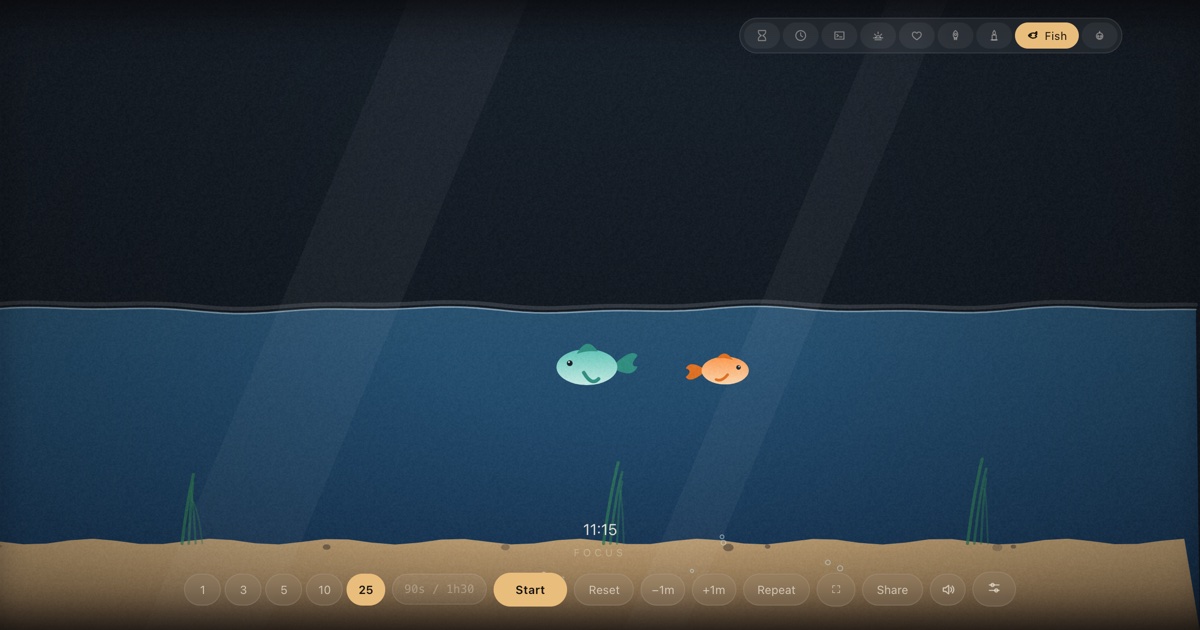
A little glass tank that drains as the minutes pass — fish, bubbles and a sandy floor that surfaces when time is up.
At a glance
| Best for | Bath time, playtime transitions, waiting rooms, quiet classroom rounds |
| Tunables | Fish count, species, fish size, water colour, bubbles, plants & sand |
| Finish sound | Three water drops, then a two-note surf chime — synthesized, no audio files |
| Fullscreen | Press F once the timer is open — built for projectors and TVs |
| Direct link | timer.cool/timer/?skin=aqua&t=300 opens this skin at 5 minutes |
Why there is a fish tank on a timer
The origin story of the aquarium skin, from the people who drew it.
The aquarium began as an answer to the most common question in a room with a small child in it: how long? A five-minute warning means very little at that age — “five” is an abstraction, and a number counting down is just another number. A tank of water is not. Show a kid a tank draining toward the sand and they can see the answer from across the room, without reading a single digit.
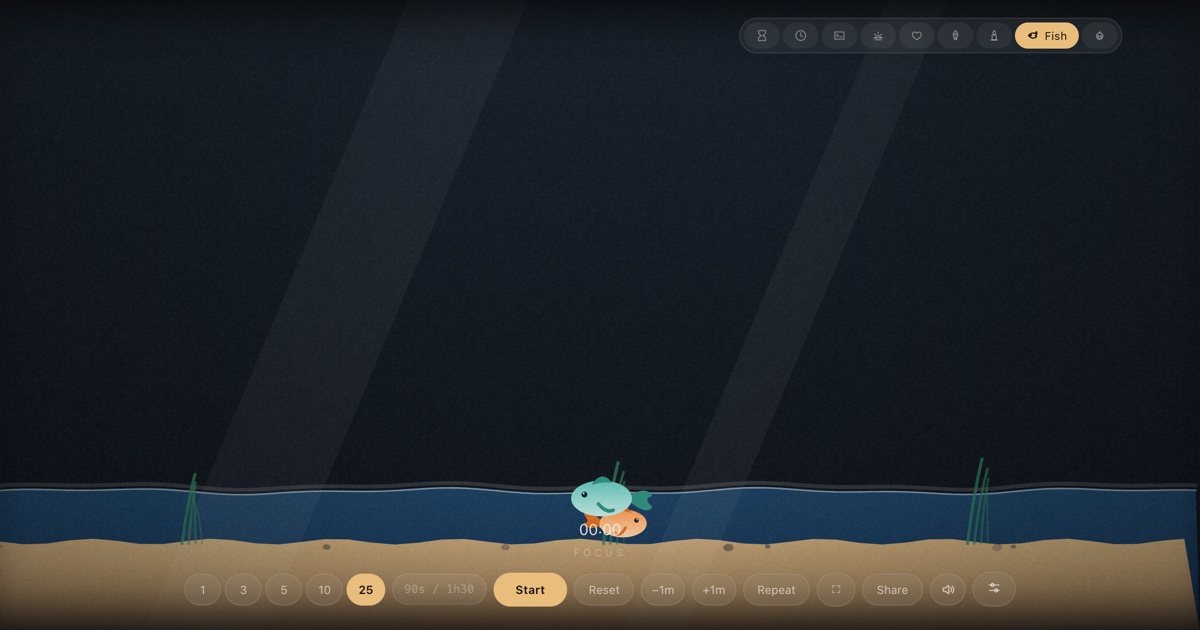
That is also why the tank is drawn as a physical place rather than a progress bar. The water line wobbles like a surface, not a spreadsheet. Two weeds sway on the sand and keep swaying after the water has dropped past them — now in air, slower and sadder. Bubbles rise from the floor and pop at the surface line, wherever it currently is. The fish cruise on lazy sine-wave paths, and as the pool shrinks, their wide laps tighten into small circles so they always stay inside the water that is left. Nothing is punished when time runs out; the fish simply settle into the shallows and wait.
Drawing the fish came first, and the details that make them feel alive are small: a body that is a gradient from back to belly, a tail that wags faster while the timer is actually running than while paused, an eye with a single white glint. The species followed — a clownfish in orange and a teal companion, a rounder goldfish, a slim neon tetra — and “random mix” for people who just want a busy tank.
The four waters came from requests: ocean blue for the classic look, deep sea for a darker room, lake green for a nature table. Sakura pink was the last, added because a cherry-blossom tank photographed beautifully on a classroom wall — and because a pink aquarium is the kind of wrong that turns out to be entirely right.
How the scene moves
- Idle. The tank sits nearly full — the water line starts 14% of the way down the stage — with fish cruising and bubbles occasionally rising.
- Running. The surface wobbles and sinks with the countdown, from that high line down to 78% of the stage height. Fish swim a little faster, tails wagging, and the weeds drift between “under water” and “not”.
- The last stretch. The pool is shallow; the fish tighten their circuits and settle into what is left. Fewer bubbles, quieter scene — the room leans in.
- Zero. The chime plays three fat water drops and a soft two-note surf chord. The readout flips to
+mm:ssovertime so late finishes stay honest, and the tank holds still until you reset.
Make the tank yours
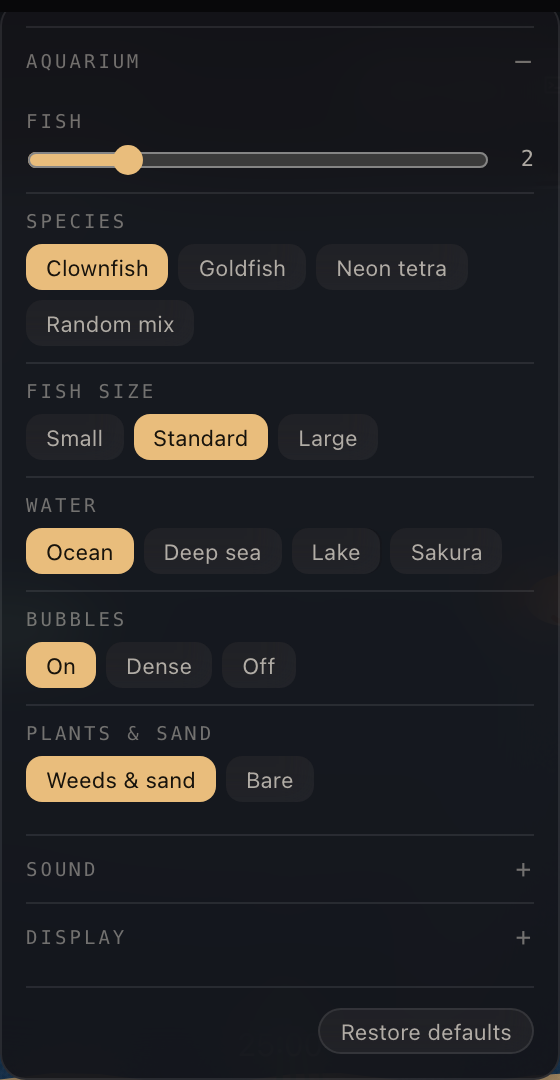
The sliders button in the bottom control row opens Scene settings. Every option below is stored in your browser and survives reloads; nothing is sent anywhere.
| Setting | Choices | Default |
|---|---|---|
| Fish | 1 – 6 (slider) | 2 |
| Species | Clownfish · Goldfish · Neon tetra · Random mix | Clownfish |
| Fish size | Small · Standard · Large | Standard |
| Water | Ocean · Deep sea · Lake · Sakura | Ocean |
| Bubbles | On · Dense · Off | On |
| Plants & sand | Weeds & sand · Bare | Weeds & sand |
Two shared panels live in the same place for every skin. Sound picks the finish chime (or “match the skin”), sets the volume, and adds an optional tick for each of the last ten seconds. Display moves the countdown readout — bottom, top, centre, bottom-left or bottom-right — and recolours it: follow theme, warm white, white, gold, ice blue or coral.
Copy-paste links
Tank options travel in the link itself, so a configured aquarium opens the same way for whoever you send it to:
| Default tank, 5 min | /?skin=aqua&t=300 |
| Sakura water, five mixed fish | /?skin=aqua&o=aqua:water-pink.fish-5.species-mix&t=300 |
| Deep sea neon tetras, 10 min | /?skin=aqua&o=aqua:water-deep.species-neon&t=600 |
| Bare tank, 3 min tidy-up | /?skin=aqua&o=aqua:decor-plain&t=180 |
| …and start it running on open | append &s=1 to any link above |
The sound it makes
When the tank empties you hear three plump water drops — a downward, then upward bend —
followed by a gentle two-note surf chord. Like everything in timer.cool, the sound is
synthesized by the browser at the moment it plays, so there is no audio file to fail
loading and nothing to download. You can keep it, swap in a bell, digital beep, wood
block or alarm from the Sound panel, or mute entirely with M.
On a projector or TV
The aquarium is at its best on the room’s biggest screen. Open the timer, press
F, and every control disappears — the tank and the readout are the only
things on screen. While a timer runs, the page holds a wake lock so the display does
not dim mid-story.


The keyboard map: Space start/pause, F fullscreen, R
reset, M mute, +/− give or take a minute while
running, L repeat. Two honest limits: on an iPhone the ringer switch silences
web audio, and aggressive battery-saver modes can override the wake lock on some devices.
Who the aquarium is for
Bath time
A tank that empties as the tub fills is the fairest deal in the house — and the surf chime carries from the bathroom speaker.
Classroom transitions
Tidy-up rounds and quiet reading: the class watches the pool shrink instead of asking how long is left.
Waiting rooms
A calm fish tank on a clinic TV buys patience; the drain gives “about ten minutes” an honest shape.
Questions
Does the aquarium drain in real time?
Yes. The water line is tied to the countdown, not to frame counts, so the level always matches the time actually left — even if the tab was in the background for a while.
What happens to the fish when the tank is empty?
Nothing grim. As the water drains, the fish tighten their circuit and settle into the shallow pool that remains, then keep swimming there until the chime.
Can I change how many fish are in the tank?
Yes. Scene settings has a Fish slider from one to six, plus species choices: clownfish, goldfish, neon tetra or a random mix.
Is the aquarium timer free?
Yes. No account, no paywall, and nothing is uploaded — the tank is drawn by your own browser.
Can I share a link to this exact tank?
Copy any recipe link on this page, or set the tank up and press Share — the link carries the duration and the tank options.
Will the chime play on an iPhone with the mute switch on?
No. iOS silences web audio when the ringer switch is set to silent, so flip the switch or use another device for the finish chime.