Cute countdown timer
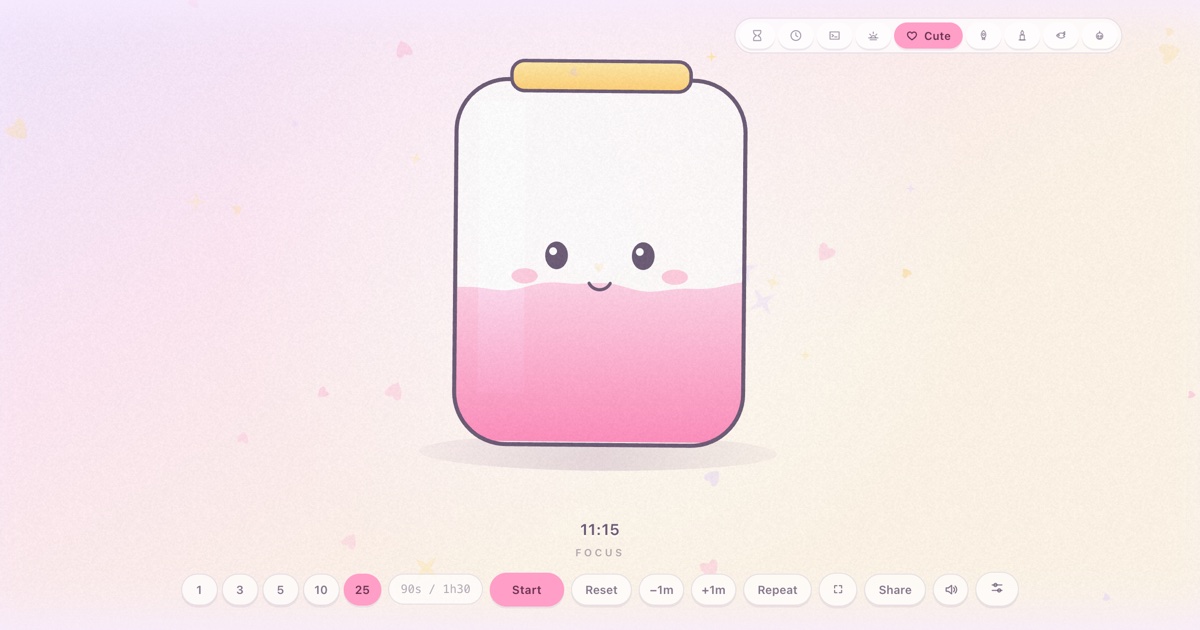
Rounded, pastel and friendly: a jar of pink sand with a face that rides the level, blinks at you, and throws confetti when time is up.
At a glance
| Best for | Kids' routines: brushing teeth, homework blocks, turn-taking, tidy-up time |
| Tunables | Jar colour, floaters (hearts / stars), sparkle density, jar size |
| Finish sound | A bright five-note run up the scale — synthesized, no audio files |
| Fullscreen | Press F once the timer is open — built for projectors and TVs |
| Direct link | timer.cool/timer/?skin=cute&t=300 opens it at 5 minutes |
Why the jar has a face
The origin story of the cute skin, from the people who drew it.
The cute skin started as a dare with a straight face: an hourglass, but make it a creature. The classic hourglass shape had already been drawn — brass and serious — so this one went the other way entirely: a rounded jar with a cork-gold lid, filled with pastel sand, sitting on the softest background the site allows, a sky that fades from lilac to peach to cream.
The face was the design decision that made everything else click. It rides the sand's surface — eyes, blush and a small smiling mouth sitting exactly at the level line — so the jar stops being a container and becomes a creature slowly bobbing down into its own sand. Children do not have to interpret a gauge; they can see that their little jar-friend is getting comfier as time passes. While it waits it blinks, about once every five seconds, and the smile quietly swells and settles on the same slow rhythm.
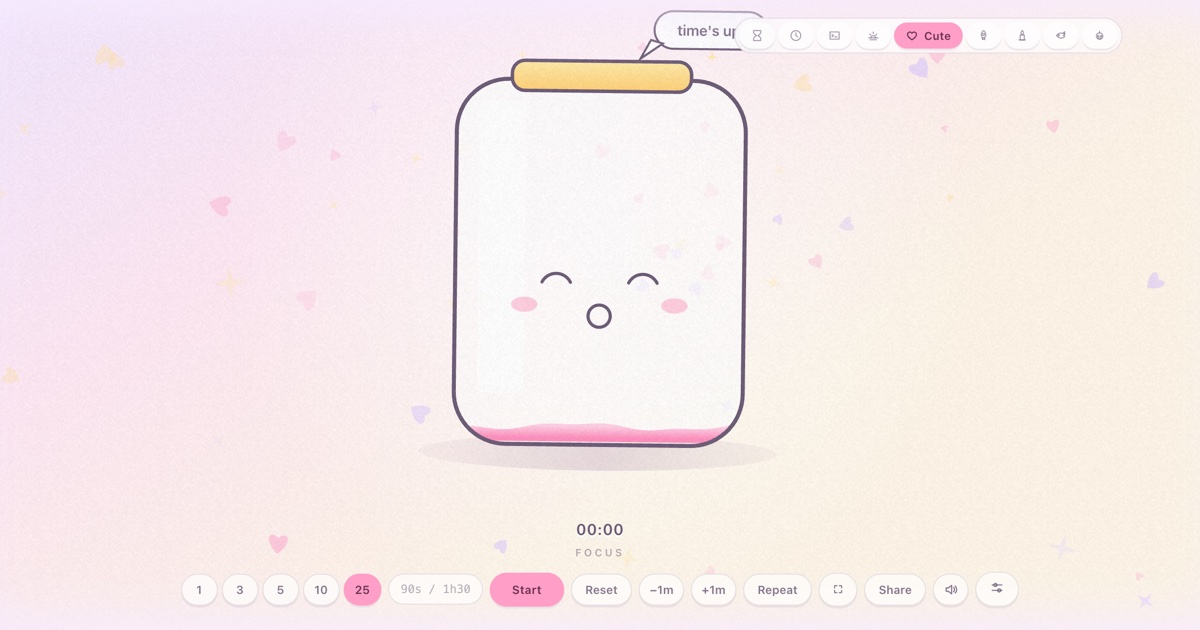
The ending is a reward, not a buzzer. At zero the eyes squeeze shut into happy arcs, a speech bubble pops up beside the lid, and a burst of pink, lilac and star confetti showers out with a bright five-note chime. Nobody loses; the sand simply runs out and the jar is delighted about it. That is the whole emotional contract of the skin, and it is why kids ask for it by name.
The jar colours came from crayon-box logic: pink is the original, mint arrived because a pastel-green jar photographed beautifully against the peach sky, lilac for the bedroom at dusk, cream for the warm end of the palette. Floaters — the little hearts and stars drifting upward — can be mixed, hearts-only or stars-only, and their density can be calm or busy, because a jar that lives on a classroom projector deserves settings just as much as one that lives on a kitchen tablet.
How the scene moves
- Idle. The jar sits full, its face near the top, blinking; hearts and stars drift gently upward and the whole scene breathes on a slow sine wave.
- Running. The sand drains with the countdown and the face rides the level down. The jar sways almost imperceptibly, the way a creature at rest would.
- The last stretch. Only a shallow layer of sand is left and the face is low in the jar — close to the floor, eyes still blinking.
- Zero. Happy closed eyes, a speech bubble, a shower of confetti and a bright five-note chime. The readout counts up
+mm:ssovertime until you reset, and the jar waits patiently to be filled again.
Make it yours
The sliders button in the bottom control row opens Scene settings. Choices are stored in your browser and survive reloads; nothing is sent anywhere.
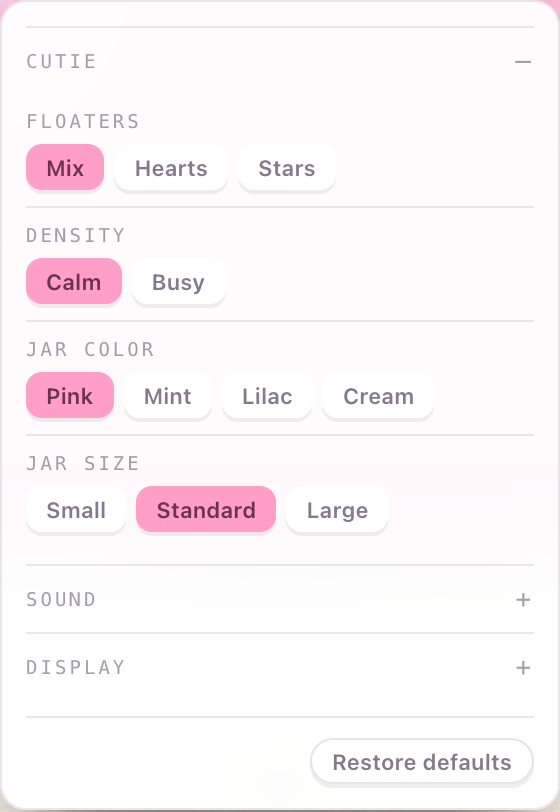
| Setting | Choices | Default |
|---|---|---|
| Floaters | Mix · Hearts · Stars | Mix |
| Density | Calm · Busy | Calm |
| Jar color | Pink · Mint · Lilac · Cream | Pink |
| Jar size | Small · Standard · Large | Standard |
Two shared panels live in the same place for every skin. Sound picks the finish chime (or “match the skin”), sets the volume, and adds an optional tick for each of the last ten seconds. Display moves the countdown readout — bottom, top, centre, bottom-left or bottom-right — and recolours it: follow theme, warm white, white, gold, ice blue or coral.
Copy-paste links
| Classic pink jar, 5 min | /?skin=cute&t=300 |
| Mint jar, hearts only, 10 min | /?skin=cute&o=cute:jar-mint.floaters-hearts&t=600 |
| Lilac jar under a dusk sky, 15 min | /?skin=cute&o=cute:jar-lilac&t=900 |
| Busy stars for a classroom projector | /?skin=cute&o=cute:floaters-stars.density-busy&t=300 |
| …and start it running on open | append &s=1 to any link above |
The sound it makes
At zero, five bright triangle-wave notes run up the scale like a music box opening,
with a soft bell on top. Like everything in timer.cool, the sound is synthesized by
the browser at the moment it plays: no audio files, nothing to download. The Sound
panel can swap in a bell, digital beep, wood block or alarm, add a tick to each of
the last ten seconds, or you can mute with M.
On a projector or TV
Put the jar on the classroom projector and the whole class shares the same little
creature counting down the tidy-up — which ends the “how much longer?” chorus better
than any number. Press F and every control disappears. While a timer runs,
the page holds a wake lock so the display does not dim before the celebration.


The keyboard map: Space start/pause, F fullscreen, R
reset, M mute, +/− give or take a minute while
running, L repeat. Two honest limits: on an iPhone the ringer switch silences
web audio, and aggressive battery-saver modes can override the wake lock on some devices.
Who the cute jar is for
Brushing teeth
Two minutes of sand and a friendly face is the difference between a battle and a ritual.
Turn-taking
Five minutes each, jar on the TV: when the confetti bursts, the controller changes hands — no arguments with the referee.
Homework blocks
A ten-minute jar next to the worksheet is short enough to start and long enough to matter.
Questions
How does the cute timer show time left?
The sand in the jar drains with the countdown, and the little face rides the sand's surface — so the jar slowly empties from full to nearly bare, and the face comes down with it.
What happens at zero?
The jar's eyes squeeze shut happily, a speech bubble pops up, and a burst of confetti hearts and stars flies out while a bright five-note chime plays.
Can I change the jar colour?
Yes. Scene settings offers pink, mint, lilac and cream jars, plus a choice of drifting floaters — mixed, hearts only, or stars only — and a calm or busy sparkle density.
Is this timer good for young children?
It was drawn for them: no numbers required to read it, nothing alarming happens at the end, and the finish is a celebration rather than a buzzer. Grown-ups do the pressing.
Is the cute timer free?
Yes. No account, no paywall, and nothing is uploaded — the jar is drawn by your own browser.
Does the jar still count correctly in the background?
Yes. The countdown is measured against the system clock, so switching tabs or locking the screen does not slow the sand down.